Fence quote requests
When a homeowner sends a quote request from the fence visualizer, your team starts with the choices already made: the fence line, the style, the stain and previews of their own yard.
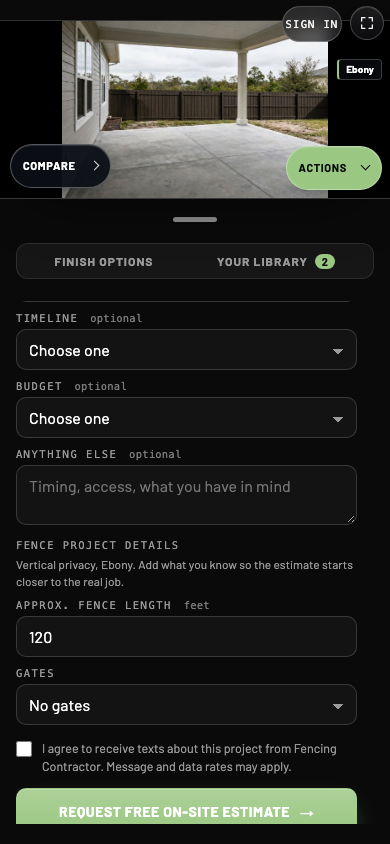
- 1Style and stain
Filled in from the preview the homeowner chose.
- 2Fence length
Carried over from the placement step. The homeowner can edit it.
- 3Gates
How many gates the homeowner wants.
What a fence request contains
| Part | What you get |
|---|---|
| Contact | Name, phone, email, ZIP code and project type, plus the project street address when given. |
| Timing and budget | The timeline and budget range when chosen. |
| Notes | Anything else the homeowner typed. |
| Text consent | Whether they agreed to texts about the project, with the statement they agreed to. |
| Previews | Lasting links to the original yard photo, up to four chosen previews and the walkthrough video when included. |
| Fence details | Style, stain, placement, approximate length in feet and number of gates. |
| Source | The page the request was sent from. |
Placement tells you how the fence line was set. drawn means the homeowner drew the line, and auto means they chose Choose placement for me. The original photo and previews show where the fence goes.
If the previews cannot be stored when the request is sent, the request still arrives without them, and the homeowner is told the images could not be attached. A missing picture never costs you the lead.
Where requests go
Every request is sent by email. When a GoHighLevel, Housecall Pro, Jobber or webhook connection is set up for your account, the request goes there too. Contact CoatFlow to connect one. How the details are laid out depends on where you receive them.
For CRM and webhook connections, the fence details arrive in their own fencing object inside the request's visualizer data, so your system can tell fence requests apart without reading notes. An example:
"fencing": {
  "style": "Vertical privacy",
  "stain": "Ebony",
  "placement": "drawn",
  "lengthFt": 120,
  "gateCount": 1,
  "timeline": "30-days",
  "budget": "3000-6000"
}
Length, gates, timeline and budget appear only when the homeowner provides them.
When the built-in form is used
The in-visualizer form appears when your visualizer uses CoatFlow's quote intake. Otherwise Get a quote on this preview opens the quote page set in Brand, and requests arrive through your website's own form without the fence details. The homeowner can export a preview to attach there.
Check it end to end
After installing, send one request from your own website using your own name and phone number. Confirm it arrives with the previews and fence details where your team works. See Request a quote for the homeowner's view of the form.