Usage and credits
Open Usage to check how many photo and video renders remain in your account.
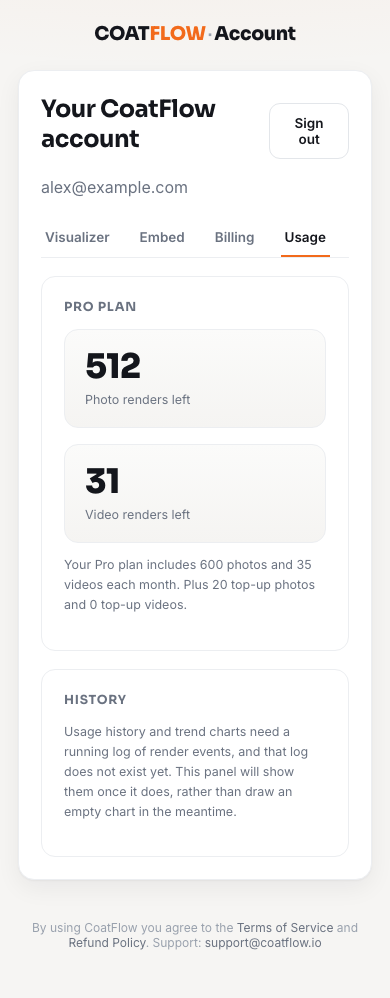
Example account data. Your company details, plan and balance will differ.
- 1Usage tab
Open your allowance view.
- 2Photo renders left
The remaining still preview allowance.
- 3Video renders left
The remaining walkthrough allowance.
- 4History
The current screen does not provide history or trend charts.
Read your balance
| Item | Meaning |
|---|---|
| Free trial / plan heading | Identifies the trial or active plan. |
| Photo renders left | Remaining allowance for new fence previews. |
| Video renders left | Remaining allowance for walkthrough clips. |
| Plan description | Included monthly quantities for the current plan. |
| Top-up description | Additional photo or video credits when present. |
| Subscribe to a plan | On the trial view, opens Billing to choose a plan. |
The visualizer on your website uses your account's rendering allowance. A homeowner does not need a contractor account to use the embedded widget. Some visitor features can separately offer or require sign-in.
Each new render counts, including a new fence line or stain on the same photo. Reopening a saved preview from the library does not create a new render.
If a balance reaches zero
Review Billing for the available plan or top-up options. Photo and video balances are separate; having photos available does not mean a video can be created.
History
The Usage screen does not include per-render history, date filters, downloadable usage reports or trend charts. Use the balance figures for the information available today.
If a number looks out of date
Reload your account after a short wait, especially after checkout. If the value still does not match what you expect, contact support with your account email and a description of the issue. Do not send your password or verification codes.