Choose a wood stain
After you open a style, the picker shows Choose a wood stain. The colors are Olympic exterior wood stain products, and each tile shows the color name and product code. Select a tile, then Render photo.
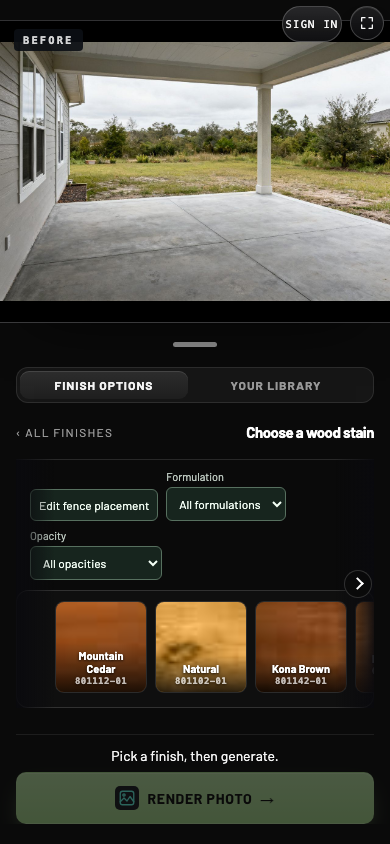
- 1Formulation
Show all stains, only water-based or only oil-based.
- 2Opacity
Show transparent, semi-transparent or solid stains.
- 3Stain tile
Select a color. The name and product code appear on the tile.
- 4All finishes
Go back to the fence styles.
Filter by formulation and opacity
| Filter | Choices |
|---|---|
| Formulation | All formulations, Water-Based, Oil-Based |
| Opacity | All opacities, Transparent, Semi-Transparent, Solid |
Opacity decides how much of the wood grain shows. A transparent stain tints the wood and keeps the grain visible. A semi-transparent stain adds more color while some grain still shows. A solid stain covers the grain much like paint while keeping the wood texture.
The two filters work together. When no stain matches both, the picker says so and shows no tiles.
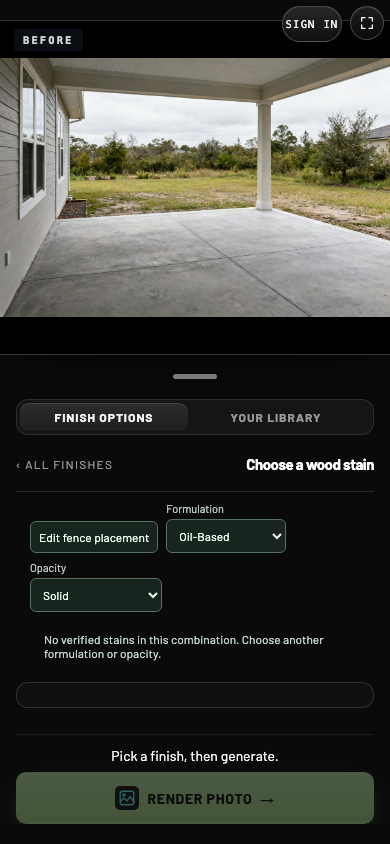
- 1No match
Change the formulation or opacity to see stains again.
The stain colors
| Formulation | Transparent | Semi-Transparent | Solid |
|---|---|---|---|
| Water-Based | Mountain Cedar, Natural, Kona Brown | Cedar Naturaltone, Atlas Cedar, Rustic Cedar | Mystic Black, Ebony, Mahogany |
| Oil-Based | Mountain Cedar, Natural, Kona Brown | Atlas Cedar, Cedar Naturaltone | None |
Some color names appear in both formulations. They are different products with different product codes on their tiles. Use the Formulation filter to pick the one you want.
Check the product
After you select a stain, View selected stain at Home Depot opens that product's page in a new tab. Use it to check the product name and details before you buy.
Colors on screen
A stain looks different on every fence. Wood species, age, the number of coats and the light all change the result, and screens show color differently. Use the preview to narrow your choice, then confirm with a sample board or your contractor.