
Key takeaways
- Two of the three built-in demo rooms are outdoors, a covered patio and a pool deck, so a homeowner can try every finish before taking a photo.
- On their own photo, the preview puts your finish beside their house, coping and pool tile in about 15 seconds.
- A preview shows color and pattern only. Slip resistance, UV stability and surface temperature come from your system, its data sheets and your site visit.
- Lead with flake on open patios, quartz or flake on pool decks, and solid color or flake on covered patios and lanais.
- Shoot outdoor slabs dry and in even light (overcast, open shade, early morning or late afternoon), because shadows in the photo can carry into the preview.
How it works
How a patio coating visualizer works outdoors
A homeowner takes a phone photo of their patio, pool deck, lanai or walkway on your website, picks one of your finishes, and sees it on their own slab in about 15 seconds. Their house, their yard and their light stay in the picture. Then they tap the next finish and it renders on the same photo.


Patios are rarely one flat rectangle, and that is the real test of an outdoor concrete coating visualizer. This one curves around the lawn, runs under a deck and drops down a flight of steps. In the preview the flake carries across the patio, the walkway and every tread, while the crew and the shop vac stay put.
A slider sets the bare slab against the new floor. With Compare view on, they can line up two to four finishes side by side. See the whole flow, from photo to quote request.
Demo rooms
Built-in patio and pool deck demo rooms
Two of the three built-in demo rooms are outdoors: a covered patio and a pool deck. The third is the demo garage. A homeowner at work, or one who has not cleared the patio yet, taps a room and previews every finish right away.
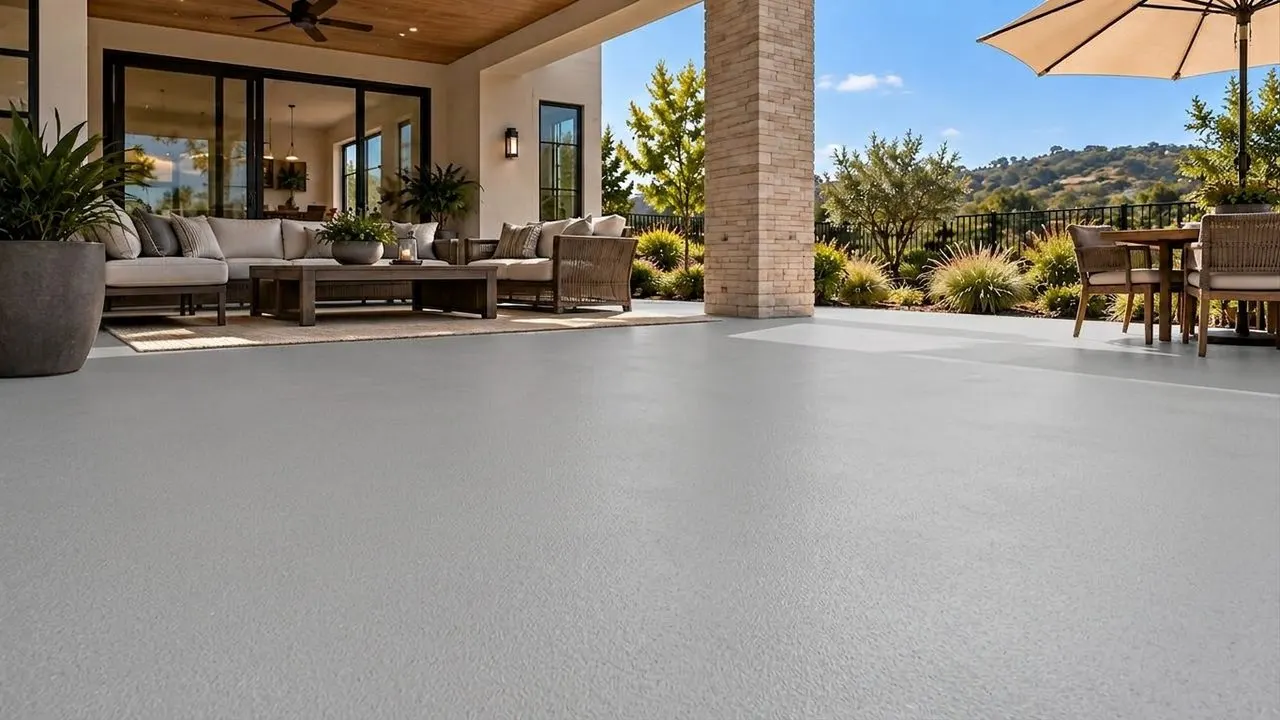
The demo patio from the widget, in Pewter solid color. An illustrative AI preview, not a photo of an installed floor. 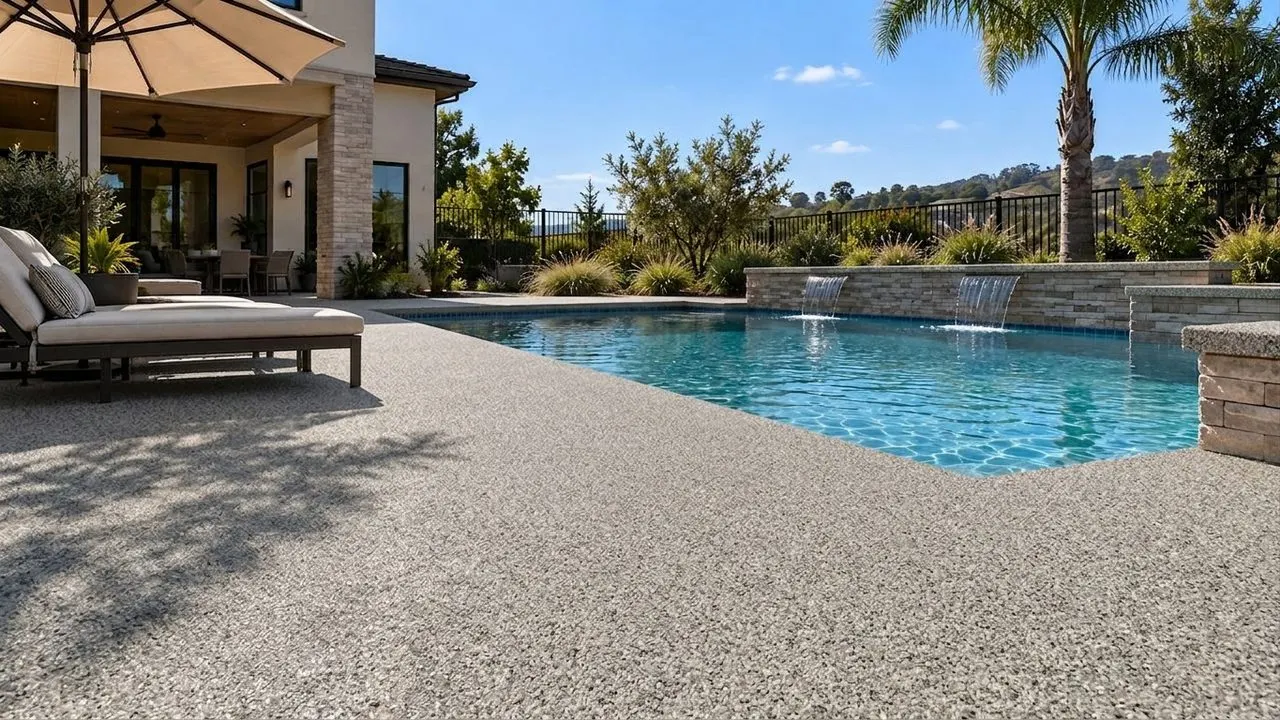
The demo pool deck from the widget, in Limestone broadcast quartz. An illustrative AI preview, not a photo of an installed floor.


Finishes
Flake, quartz or solid color on a pool deck or patio
Lead with flake on open patios, quartz or flake on pool decks, and solid color or flake under a roof, wherever your system is rated for it. The visualizer renders four finish families today (flake, metallic, quartz and solid color), and your catalog is built around your own products from your color charts, set up by our team with no setup fee.
| Space | Show first | Settle on site |
|---|---|---|
| Open patio in full sun | Flake blends, lighter ones first, including polyaspartic flake systems | A UV-stable topcoat, the grit, slope and drainage |
| Pool deck | Broadcast quartz or flake | Texture profile, grit, chemical resistance and cure time before anyone swims |
| Covered patio or lanai | Solid color or flake | Moisture in the slab and the transition at each door |
| Walkways and steps | The same finish as the patio they connect to | Edges, nosings and grit on every tread |
Metallic renders too. Whether it belongs outside is your system's call, so show it where you would install it.
Quartz and flake can look close on a chart and nothing alike beside water. Run both on the same photo of their deck and let them choose with the pool in the frame.

Buying questions
What a pool deck coating visualizer can and cannot answer
A pool deck coating visualizer answers one buying question well: will it go with the house. Heat, slip and fade are yours to answer, from your system and its data sheets. Here is where each answer comes from.
| What the homeowner asks | Can the preview show it? | Where your answer comes from |
|---|---|---|
| Will it go with the house, the coping and the pool tile? | Yes. The finish sits in their own photo, beside their siding, trim, coping and water. | A chip held against the coping in daylight confirms it. |
| Will it be hot under bare feet? | No. A preview shows color, not temperature. | Color helps: lighter, more reflective surfaces stay cooler in the sun than dark ones (Berkeley Lab and EPA on cool pavements). In one Berkeley Lab infrared image, a light pavement segment reads about 30°F cooler than the dark one beside it. Coatings differ, so answer from your system. |
| Will it be slippery when wet? | No. Grip cannot be seen in a photo. | Your topcoat, the anti-slip additive and the grit size. Write all three into the quote. |
| Will it yellow or fade in the sun? | No. A preview is day one, every time. | Your topcoat resin and its data sheet. One Sherwin-Williams industrial epoxy data sheet says all epoxies will chalk and fade outdoors without a topcoat (B67-200 data sheet). |
| Will pool chemicals or salt water hurt it? | No. | The chemical resistance section of your data sheet. |
| Can you do it this summer? | No. | Your products' slab temperature limits. Sherwin-Williams, for one, says not to install its Resuflor epoxy when the slab is above 90°F, and to coat once the sun has passed over the area. |
Color
Matching the finish to the house, the coping and the pool tile
Color is the question a preview settles best, because outdoors the floor never stands alone. It sits beside siding, trim, a roofline, pavers, coping and a band of pool tile, and all of it stays in the photo.
- Start from what will not change. Coping, pool tile, brick and roof color are fixed. Pick finishes that sit well beside them, then narrow from there.
- Run one warm and one cool. A tan and a gray on the same deck settle the direction in two previews, like the pair below.
- Put the finalists side by side. Compare view lines up two to four on one screen, which makes one clean screenshot for whoever was not home.
- Confirm with a chip. Bring the two finalists to the visit and hold them against the coping in daylight.
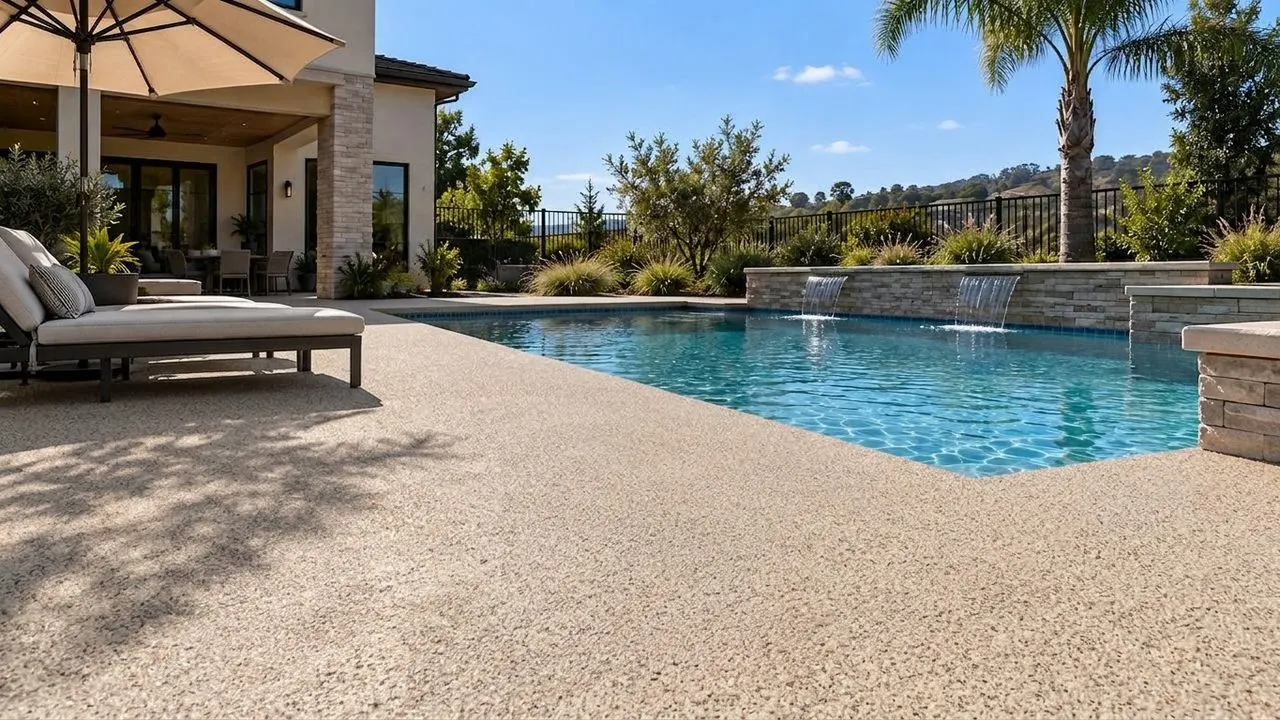
Warm: Mojave quartz on the demo pool deck. An illustrative AI preview, not a photo of an installed floor. 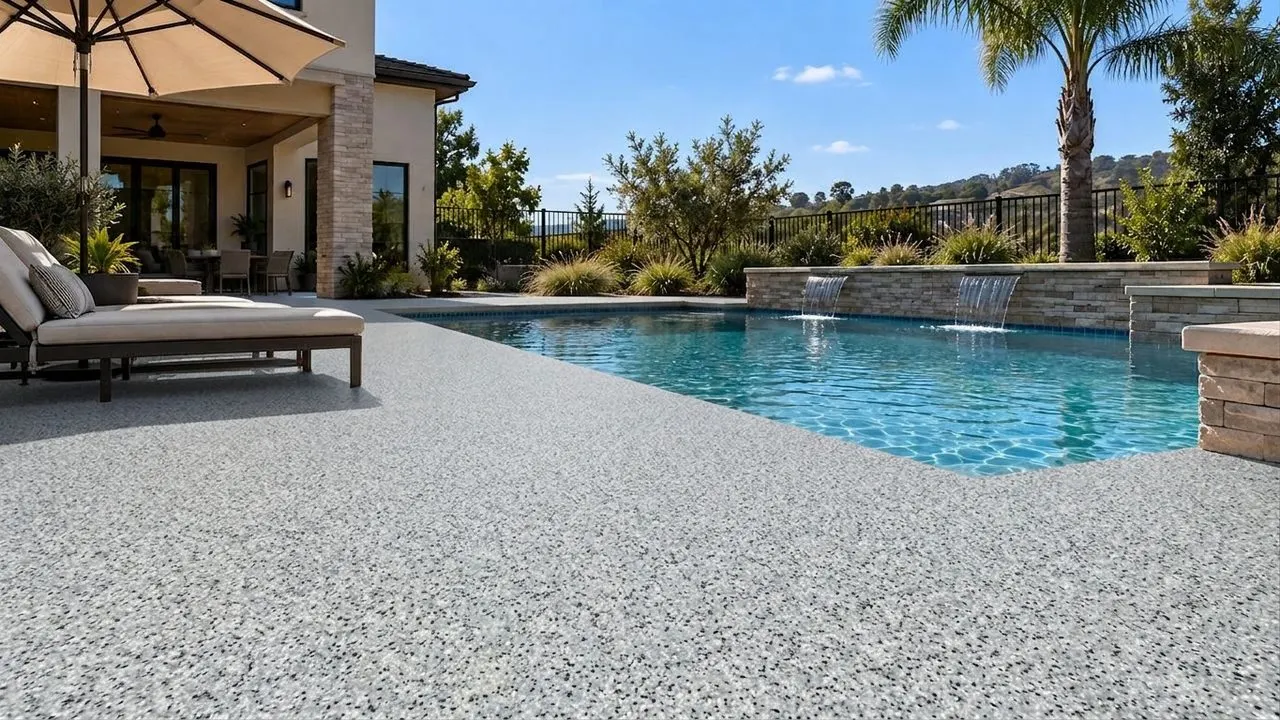
Cool: Slate quartz on the same deck. An illustrative AI preview, not a photo of an installed floor.


Why the chip board still has a job at the visit, and how to help a homeowner narrow down flake colors.
Photo tips
Photo tips for patios and pool decks: shade, sun and time of day
Shoot the slab dry, in even light, with part of the house or the pool in the frame. Shadows in the photo can carry into the preview: on the demo pool deck above, the umbrella shade stays in the Limestone and Mojave previews. A hard noon shadow can do the same to half of a new floor.
01
Pick the hour.
Overcast days, open shade, or early morning and late afternoon give soft, even light. Midday sun gives the hardest shadows and the most glare off the water.
02
Shoot it dry.
Wet patches and puddles read as dark stains. After rain or a hose-down, wait for the slab to dry.
03
Clear what you can.
Move loungers, hoses, toys and planters off the slab. The preview keeps what sits on the floor, and the slab under it stays hidden.
04
Get the whole slab and something fixed.
Shoot from a corner at chest height, with part of the house or the pool edge in the frame. JPG, PNG or HEIC up to 10 MB, no filters.
Video and quote
From a backyard preview to a walkthrough clip and a quote
Any finished preview can become a short walkthrough video of their own patio or deck, easy to text to a spouse. Starter films 5 clips a month at 3 seconds each, Pro films 35 at 5 seconds, and each clip takes a few minutes. It is an illustrative AI video of the preview, not footage of an installed floor.
Then the quote button opens your own quote or booking page, in Housecall Pro, Jobber or whatever you use. On Pro, you also get lead follow-up by text and email, set up and run for you by our team, that chases every lead to a booked estimate.
It installs with one script tag on WordPress, Squarespace, Webflow or plain HTML (a custom element on Wix), and the widget shows your company name and brand color, with no CoatFlow branding. Add the visualizer to your website.
Pricing
What the patio and pool deck visualizer costs
Two plans: Starter at $99 a month and Pro at $149 a month. Both start with a 7-day free trial (card at signup; cancel before day 7 and you pay nothing). A photo credit is one preview. Compare the plans in full.
Paying yearly? Starter is $79 a month and Pro $119 a month, billed once a year ($948 and $1,428): 20% off. Ask our team to set it up.
Starter
$99 a month
$79 a month(instead of $99 a month)
The visualizer on your website, with walkthrough video.
Start your 7-day trial of Starter7 days free, then $99 a month.
Ask for Starter yearly$948 billed once a year: you save $240. Our team sets up yearly billing for you.
Or start the 7-day trial, billed monthly- 300 photo credits a month
- 5 walkthrough video clips a month, 3 seconds each
- Your finish catalog, built from your color charts: flake, metallic, quartz and solid color
- On your website with one script tag
- White-labeled: your company name and brand color, no CoatFlow branding in the widget
- Photo top-up packs when a month runs over
Pro
More video, plus follow-up
$149 a month
$119 a month(instead of $149 a month)
More video, longer clips, and follow-up our team runs for you.
Start your 7-day trial of Pro7 days free, then $149 a month.
Ask for Pro yearly$1,428 billed once a year: you save $360. Our team sets up yearly billing for you.
Or start the 7-day trial, billed monthly- 600 photo credits a month
- 35 walkthrough video clips a month, 5 seconds each
- Photo and clip top-up packs
- Lead follow-up by text and email, set up and run for you by our team, that chases every lead to a booked estimate
- Everything else in Starter
Try it on a backyard photo
Upload a photo of any patio or pool deck, or tap the demo pool deck, and see a finish on it in about 15 seconds.
Sources
Figures from other companies and publishers are quoted as their pages stated them on October 6, 2026. Prices change; check the source before you rely on one.